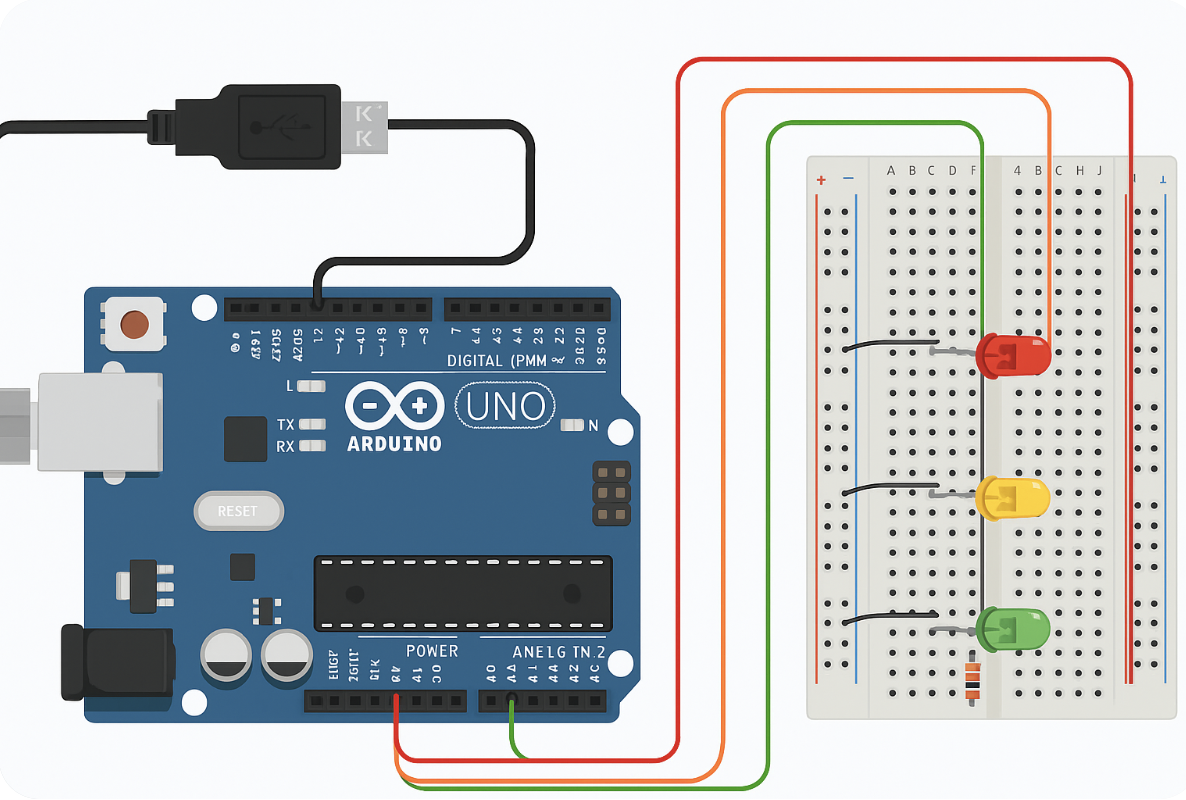

Proyek Sederhana dan Edukatif untuk Anak SD & SMP
Simulasi rambu-rambu lalu lintas dengan Arduino Uno menggunakan LED merah, kuning, dan hijau. Cocok untuk anak SD dan SMP. Dilengkapi panduan alat, rangkaian, dan kode program.
Pernahkah kamu memperhatikan lampu lalu lintas di jalan raya? Ada tiga warna utama yang memberi sinyal kepada pengendara — merah (berhenti), kuning (hati-hati), dan hijau (jalan). Nah, sekarang kita akan membuat versi mini-nya menggunakan Arduino Uno! Proyek ini seru dan mudah dipahami, cocok untuk siswa SD dan SMP untuk belajar dasar elektronika dan pemrograman.
Alat dan Bahan:
| No | Nama Komponen | Jumlah |
|---|---|---|
| 1 | Arduino Uno | 1 buah |
| 2 | LED Merah | 1 buah |
| 3 | LED Kuning | 1 buah |
| 4 | LED Hijau | 1 buah |
| 5 | Resistor 220 ohm | 3 buah |
| 6 | Kabel Jumper | secukupnya |
| 7 | Breadboard | 1 buah |
| 8 | Kabel USB untuk Arduino | 1 buah |
| 9 | Laptop + Arduino IDE | 1 set |
Cara Merakit Rangkaian:
- Pasang LED di breadboard:
- LED merah, kuning, dan hijau dipasang berjajar.
- Kaki panjang (anoda/positif) akan disambung ke pin digital Arduino.
- Kaki pendek (katoda/negatif) ke GND lewat resistor.
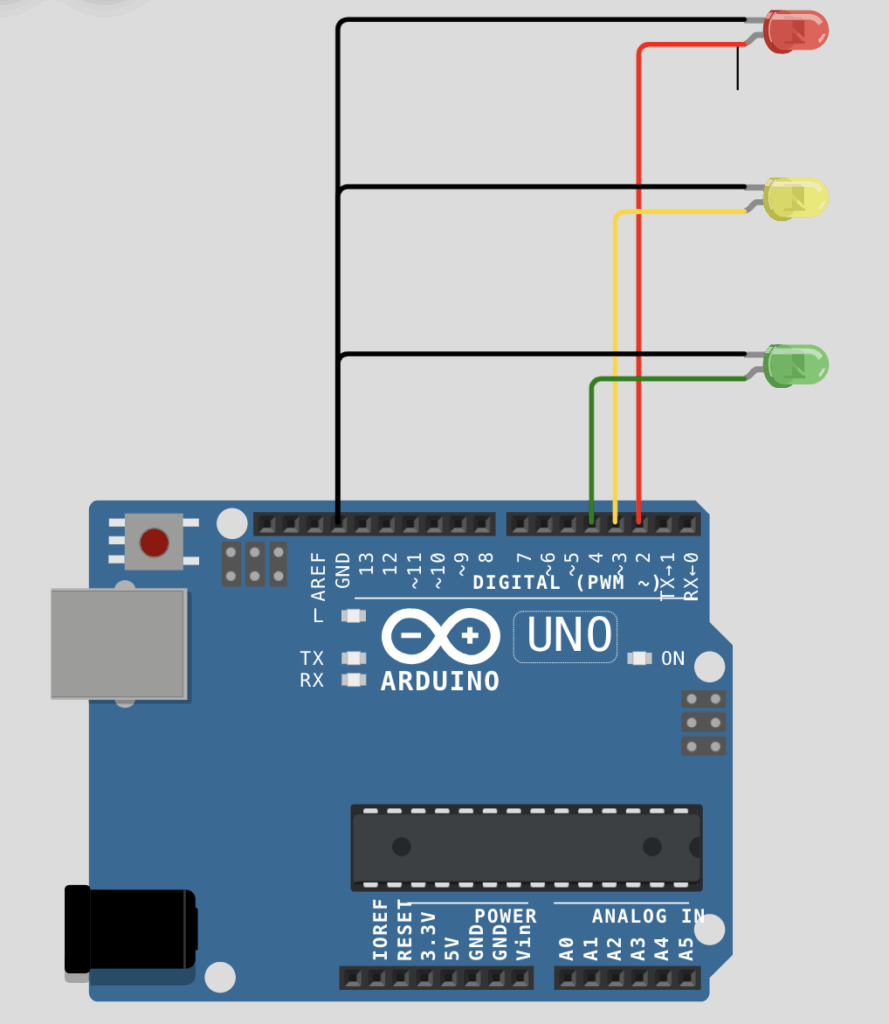
- Sambungkan kabel jumper:
- LED Merah → Resistor → pin 2 Arduino.
- LED Kuning → Resistor → pin 3 Arduino.
- LED Hijau → Resistor → pin 4 Arduino.
- Semua kaki negatif LED dihubungkan ke GND (ground) Arduino.
- Hubungkan Arduino ke laptop menggunakan kabel USB.
Upload Kode Program ke Arduino:
- Buka Arduino IDE.
- Klik menu File > New.
- Copy dan paste kode berikut:
// Pin untuk LED
const int ledMerah = 2;
const int ledKuning = 3;
const int ledHijau = 4;

void setup() {
  // Set pin sebagai output
  pinMode(ledMerah, OUTPUT);
  pinMode(ledKuning, OUTPUT);
  pinMode(ledHijau, OUTPUT);
}

void loop() {
  // Merah menyala (berhenti)
  digitalWrite(ledMerah, HIGH);
  digitalWrite(ledKuning, LOW);
  digitalWrite(ledHijau, LOW);
  delay(5000); // 5 detik

  // Kuning menyala (hati-hati)
  digitalWrite(ledMerah, LOW);
  digitalWrite(ledKuning, HIGH);
  digitalWrite(ledHijau, LOW);
  delay(2000); // 2 detik

  // Hijau menyala (jalan)
  digitalWrite(ledMerah, LOW);
  digitalWrite(ledKuning, LOW);
  digitalWrite(ledHijau, HIGH);
  delay(5000); // 5 detik

  // Kuning berkedip sebelum ke merah lagi
  digitalWrite(ledHijau, LOW);
  for (int i = 0; i < 3; i++) {
    digitalWrite(ledKuning, HIGH);
    delay(300);
    digitalWrite(ledKuning, LOW);
    delay(300);
  }
}
- Pilih Tools > Board > Arduino Uno.
- Pilih Port yang sesuai.
- Klik tombol Upload (panah kanan).
- Tunggu hingga muncul “Done Uploading”.
Kesimpulan:
Proyek ini mengajarkan anak-anak tentang fungsi lampu lalu lintas, sekaligus mengenalkan mereka pada logika pemrograman dan elektronika sederhana. Dengan alat yang terjangkau dan kode yang mudah, anak-anak bisa langsung melihat hasil dari kodenya dalam bentuk lampu yang menyala bergantian — persis seperti rambu-rambu di jalan raya. Kegiatan ini bisa membangkitkan rasa ingin tahu dan semangat belajar teknologi sejak dini.

Keep this going please, great job!
Greetings! I’ve been following your site for a long time now and finally got the courage to
go ahead and give you a shout out from New Caney Tx! Just wanted to tell you keep up the excellent work!
I know this web page provides quality based articles or reviews and extra material,
is there any other website which gives these data in quality?
Hi there, just became aware of your blog through Google,
and found that it is truly informative. I’m going
to watch out for brussels. I’ll be grateful if you
continue this in future. Numerous people will be benefited from your writing.
Cheers!
Hmm is anyone else encountering problems with the images on this blog loading?
I’m trying to determine if its a problem on my end or if it’s the blog.
Any feed-back would be greatly appreciated.
When someone writes an paragraph he/she retains the plan of a user in his/her brain that
how a user can know it. So that’s why this paragraph is outstdanding.
Thanks!
Excellent blog you’ve got here.. It’s difficult to find quality writing like yours these
days. I truly appreciate people like you! Take care!!
Can I just say what a relief to discover a person that truly
understands what they’re discussing on the net.
You actually understand how to bring a problem to
light and make it important. A lot more people need to read this and understand this side of your story.
I was surprised you’re not more popular since you surely have
the gift.
It’s awesome to go to see this website and reading the views of all friends on the topic of this piece of writing, while I am also keen of getting knowledge.
Thank you, I have just been searching for info approximately this topic
for a while and yours is the best I’ve came
upon till now. However, what in regards to the conclusion? Are you certain in regards to the supply?
bookmarked!!, I love your blog!
Hello to every single one, it’s actually a pleasant for me to pay a quick
visit this website, it contains important Information.
bookmarked!!, I really like your web site!
hello!,I like your writing so so much! percentage we
keep in touch more about your post on AOL? I require an expert on this house to unravel my problem.
Maybe that’s you! Taking a look forward to see you.
I’m not sure why but this weblog is loading incredibly slow for me.
Is anyone else having this issue or is it a problem on my end?
I’ll check back later on and see if the problem still exists.
Why viewers still use to read news papers when in this technological globe all is accessible on web?
Wonderful site. A lot of helpful info here. I am sending it to a few
pals ans also sharing in delicious. And naturally,
thanks on your effort!
Hi there! This blog post couldn’t be written any better!
Looking through this post reminds me of my previous roommate!
He constantly kept talking about this. I’ll send this post to him.
Pretty sure he’ll have a very good read. Many thanks for sharing!
Howdy! I know this is kind of off topic but I was wondering if you knew
where I could find a captcha plugin for my comment form? I’m using the same blog platform as yours and I’m having trouble
finding one? Thanks a lot!